When it comes to system performance, disk latency is one of those silent bottlenecks that can severely impact the overall responsiveness and efficiency of your application. From my experience, disk I/O is by far one of the slowest operations a system can perform, and it can become a major point of failure if not properly optimized. It’s one of those issues that can sneak up on you, especially when you’re dealing with large-scale systems or real-time applications. Whether it’s logging, serving web content, or interacting with a database, disk latency is always lurking, affecting performance in ways that are sometimes hard to track down.
In this article, we’ll explore why disk latency matters, how it impacts different types of applications, and the practical strategies you can use to minimize its effects. By the end, you’ll have a clear understanding of how to optimize disk I/O and improve the performance of your systems.
Why Disk Latency Matters
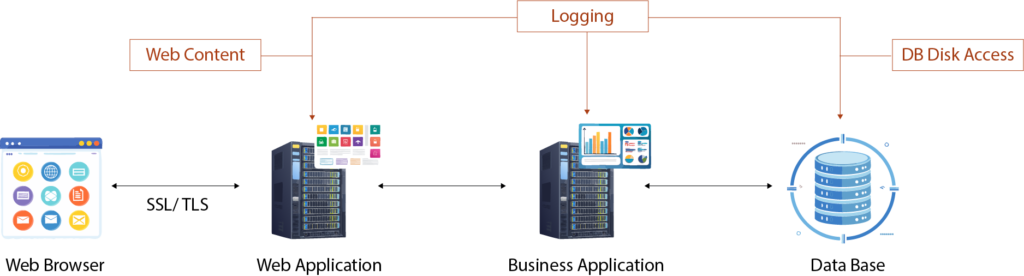
Let’s face it—pretty much every component in any system is bound to interact with disk storage at some point. For instance, logging is something that happens in almost every process. The disk access penalties related to logging are typically not as severe because logs are written in a way that doesn’t require immediate access. It’s the non-blocking nature of logging that makes it less problematic, but that’s not always the case for other types of disk I/O, particularly in web applications and databases.
Disk latency becomes a critical issue when your application requires frequent or high-speed access to data stored on disk. Whether you’re serving web content, querying a database, or processing large datasets, the speed at which your system can read from and write to disk directly impacts its overall performance.
Web Applications and Disk Latency
If you’ve ever worked with a web application, you know that web content such as JavaScript files, CSS files, and images must be pulled from the disk. Every time a user requests a resource, the application has to fetch the necessary content from disk, which can introduce significant latency, especially when dealing with large files or numerous concurrent requests. Even though we’ve made leaps in optimizing front-end technologies like caching, minification, and compression, the reality is that web applications still experience bottlenecks due to disk latency.
For instance, when you serve large media files or dynamic content that’s not cached, disk reads and writes can slow down the user experience considerably. I’ve had the chance to work on optimizing web applications in high-traffic environments, and disk I/O always presents a challenge. The speed at which disk I/O can happen becomes even more crucial as applications scale. The larger your dataset, the more disk access you’re likely to perform—and that can result in laggy performance if not addressed correctly.
Databases: Where Disk Latency Really Hurts
Databases are another area where disk latency can cause significant problems. Whether you’re reading data for a query or writing data after an update, disk access is inevitably involved. In fact, databases are probably the most sensitive to disk latency because they need to ensure data integrity while performing frequent read/write operations.
From my experience, one of the worst performance issues I’ve seen in database-heavy applications is disk bottlenecks. Every time a database needs to fetch data, whether it’s a simple record lookup or a complex query, it often means accessing the hard disk. If the database isn’t optimized for disk access, it can become painfully slow. This is especially problematic when you’re handling large datasets or working with a high volume of transactions.
Strategies to Minimize Disk Latency
So, how do we deal with this beast of a problem? Over the years, I’ve come to rely on a combination of approaches and technologies to tackle disk latency. Let’s dive into some practical strategies to minimize disk latency-related penalties and boost overall performance.
1. Optimizing Web Content Delivery: Caching and Reverse Proxies
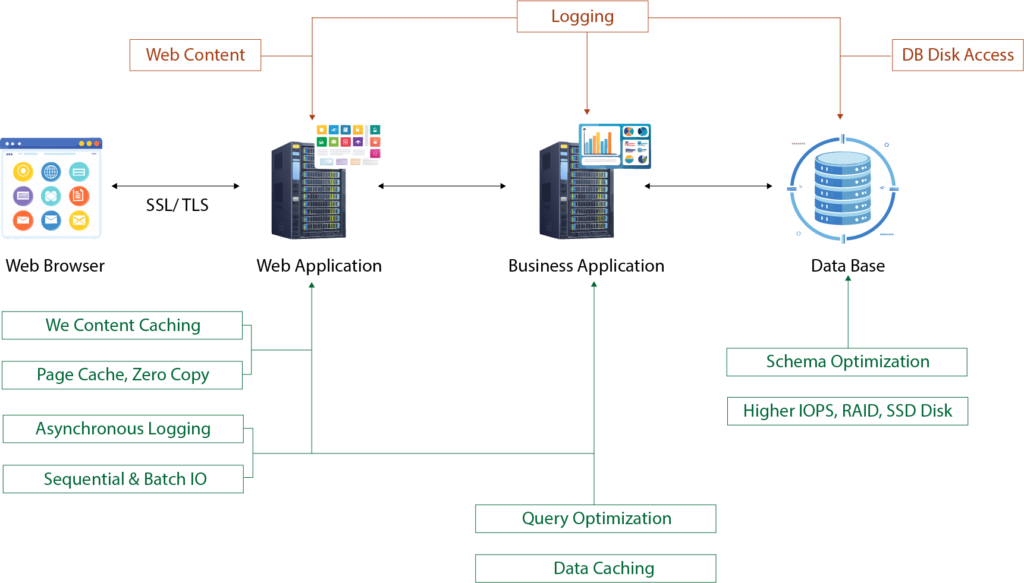
The first thing you should think about is caching. If you’re not already caching disk I/O results, you’re likely missing out on a massive opportunity to reduce latency. Whether it’s in-memory caching (using tools like Redis or Memcached) or file-based caching for disk-resident data, caching can significantly reduce the frequency with which your application needs to access the disk.
For web applications, caching static content (like images, JavaScript, and CSS) on the client side or a content delivery network (CDN) can help offload traffic from your server’s disk I/O. By caching at various layers—be it the browser, CDN, or application—you can reduce the amount of data that needs to be read from disk, greatly improving responsiveness.
In database-driven applications, caching query results or frequently accessed data in memory helps avoid redundant disk reads. This is especially helpful for large databases where some queries might be expensive to execute, but their results remain the same across multiple user requests.
Reverse Proxies for Static Content: Implementing a reverse proxy server like NGINX or Varnish can offload static file serving from your main web application server. The reverse proxy can cache static content in memory, making subsequent requests almost instantaneous. It serves dynamic content requests by passing them on to your application server. This separation of responsibilities optimizes performance by reducing disk access for static files and allowing the web application to focus on processing dynamic content.
The beauty of this setup is that reverse proxies are designed to handle a massive number of requests with minimal CPU overhead. By specializing in static content, they can efficiently serve files from memory or disk when necessary, making them a great addition to any system focused on high web performance.
2. Database Indexing and Query Optimization
When it comes to databases, indexing is one of the most effective ways to combat disk latency. If your database queries are hitting the disk repeatedly to perform full table scans, you’re bound to experience major slowdowns, especially as the data grows.
Over the years, I’ve seen massive improvements in query performance simply by ensuring that indexes are applied correctly. Indexes help the database locate the data faster without needing to scan every single record. But it’s not just about adding indexes willy-nilly—you need to think carefully about which columns are frequently queried and need indexing.
Additionally, optimizing queries is crucial. Poorly written SQL queries can introduce excessive disk I/O, even with indexes in place. Techniques like pagination (for large datasets), using limit clauses, and avoiding expensive operations can reduce the strain on disk access.
Effective Strategies for Reducing Database Disk Latency
- Caching Data: The most straightforward way to reduce database disk access is to cache frequently accessed data in memory. For read-heavy workloads, caching can eliminate the need to hit the disk at all. Tools like Redis or Memcached can be used for in-memory data storage, allowing your application to serve data without querying the database constantly.
- Denormalization: While normalization is typically the go-to practice for database schema design, there are situations where denormalization can help reduce disk I/O. For instance, if your system involves multiple JOIN operations that are causing frequent disk access, denormalizing some tables into a single one can reduce the need for complex queries, thus speeding up data retrieval. However, this should be done carefully, as it can lead to data redundancy and potential consistency issues.
- Indexes: Proper indexing can make a world of difference when trying to minimize disk access. When a database query is executed, indexes allow the system to jump straight to the location of the data rather than scanning the entire table. Without indexes, a full table scan would be required for each query, which is slow and inefficient. For example, if you’re searching for a customer in a large database, an index on the customer_id field will allow the database to jump straight to the correct record, reducing the need for extensive disk I/O.
- Optimizing Queries: Writing efficient database queries is equally important. By selecting only the columns you need and filtering out unnecessary data, you can reduce the number of disk reads required. Additionally, ensuring that your queries are properly optimized can prevent excessive data retrieval that would lead to additional disk I/O.
3. Disk and Storage Optimization
The type of disk or storage system you use can dramatically impact your disk latency. I’ve seen firsthand how solid-state drives (SSDs) can drastically reduce latency compared to traditional hard disk drives (HDDs). While HDDs are typically slower and have higher latency due to mechanical parts, SSDs offer much faster read and write speeds. If you’re still relying on spinning disks for high-performance applications, it might be time for an upgrade.
For larger systems or data centers, using RAID configurations or distributed storage systems like network-attached storage (NAS) or storage area networks (SAN) can help increase throughput and lower the chance of disk bottlenecks. The ability to spread disk access across multiple devices or drives can significantly reduce the chances of any single disk becoming a performance bottleneck.
4. Data Partitioning and Sharding
In high-scale systems, data partitioning or sharding can help mitigate the effects of disk latency. When you partition or shard your database, you split your data across multiple disks or servers, which allows the system to handle more concurrent requests without overloading any single disk.
For example, when working with a massive database, you might decide to partition your data by certain criteria (e.g., by customer ID, date, or region). This means that each partition (or shard) is stored on a separate disk or server, allowing for faster access and reducing the disk I/O bottleneck on any single node.
5. Avoid Synchronous I/O
Whenever possible, try to avoid synchronous disk I/O. Synchronous disk operations block the application until the disk operation is complete, causing significant delays and increasing latency. In contrast, asynchronous I/O allows the application to continue processing other tasks while the disk operation completes in the background.
This approach is especially useful for web servers and backend services that handle multiple requests simultaneously. Instead of waiting for a disk read or write operation to finish, asynchronous I/O lets the system continue processing requests, reducing perceived latency from the user’s perspective.
6. Logging Optimization: Efficient Sequential Access
Logging is a necessary evil in most systems, but it doesn’t have to slow you down. The key here is understanding the difference between sequential and random I/O operations. In the simplest terms:
- Sequential Access: This happens when we write data one after another in a continuous block—like when logging data to a file.
- Random I/O: This happens when we write or read data at random locations in the storage, such as querying a database or retrieving files from non-sequential spots on disk.
Logging, unlike database or application reads, tends to be sequential, meaning it can be significantly faster than random I/O. If you’ve worked with logs, you know that sequential writes typically don’t pose a big bottleneck. But still, optimizing the way we log can make a huge difference.
Best Practices for Efficient Logging
- Minimize Context Switching: If you can log multiple statements at once rather than logging them one by one, you’ll avoid unnecessary context switching. For example, if you have four separate logging calls, try to batch them into one. This minimizes the number of times the CPU has to switch contexts, improving overall system efficiency.
- Asynchronous Logging: Whenever possible, consider offloading logging tasks to a separate thread. By doing this, your main computation thread doesn’t get bogged down waiting for I/O operations to complete. The main thread can continue its work while the logging thread handles file writes in the background. However, the trade-off here is that if the application crashes unexpectedly, the last few log entries might not be saved. But if you can tolerate that, asynchronous logging can significantly reduce your system’s perceived latency.
Conclusion: Disk Latency is Manageable, But Requires Attention
To wrap things up, addressing disk latency is a multifaceted challenge that requires a combination of software optimization and hardware considerations. From efficient logging strategies like asynchronous writes to hardware optimizations such as SSDs and RAID, there are numerous ways to tackle disk latency. By adopting a holistic approach that combines caching, optimizing disk access patterns, and using specialized components like reverse proxies, you can significantly improve system performance.
Remember, every system is unique, and the key is to test and profile your application thoroughly to identify where disk latency is impacting performance the most. With the right strategies in place, you can reduce these penalties and build systems that perform at scale.
This extended and optimized version of the article is designed to rank for keywords like system performance, serial performance, measuring system performance, and concurrency while providing comprehensive insights and actionable advice.


0 Comments